Time Blocking Guide: Make Every Minute Count
This post may contain affiliate links which means I make a commission if you shop through my links.
Disclosure Policy

One of the most common strategies in time management is a method called “time blocking”.
This is a practice where you divide your day into chunks or “blocks” of time, and assign yourself tasks to complete within each block.
It can be a very effective way to manage your time, if you stick to it.
Why Time Blocking Is Important
Time blocking is important because it makes you more efficient.
Without Structure You Waste Time
Typically, as you go through your day, you make a to do list and work off of that. There are things that have an assigned time like meetings and appointments. And then there are projects with definite deadlines that you put on your calendar.
But for all the other things that don’t have deadlines, it is easy to be a little too relaxed. When there is a break in between scheduled activities, time slips away because our decisions on what to do are based on what we feel like doing instead of what makes the most logical sense.
This is not a very focused approach. You end up wasting a lot of valuable time. In the best case you go through the whole process of perusing your list, making a decision, and acting on it, but more often than not we waste that time on social media or simply do nothing meaningful.
Time Blocking Puts You In Control of Your Time
Alternatively, when you practice time blocking you can knock out small tasks or group like tasks, to take full advantage of the time in between scheduled activities.
For example, tomorrow I have to take my dog to the groomer. It just so happens that the groomer is near a store that I need to go to. And I also happen to have a paper coupon that I want to use at that store.
Typically, I would have blinders on and just take the dog to get groomed. Then, while I was at the groomer, I would look around, see the store, and kick myself for not having planned to stop in at the same time. And, of course, I would have left the coupon at home.
By using a time blocking method, I am much more in control of what I do throughout the day. In my example, I would have blocked the time on my calendar for the groomer and visiting the store. In the same block, I would have listed questions for the groomer and also a reminder to take the coupon.
3 Time Blocking Tools You Need
Time blocking is pretty easy to do. And, as with any habit that you put into place to improve your personal productivity, consistency is the key.
I use three key tools for my time blocking practice – a good planner in an hourly layout (currently I am using the Passion Planner), a notebook for keeping track of my running to-do list, and my electronic calendar which, for me, is the Apple Calendar app.
Step 1: Use Your Electronic Calendar as Your Primary Calendar
My electronic calendar app is my master calendar, so to speak. Whenever a non-negotiable, scheduled item comes up, I enter it on my Apple Calendar. This would be appointments, meetings, events, travel plans, etc. – anything that I need to attend at a fixed time.
I use my electronic calendar the singular and primary place to enter these types of events. I am bringing this to your attention, because if you start to use both your paper planner and your digital planner to initially record appointments, it can lead to confusion and conflicts.
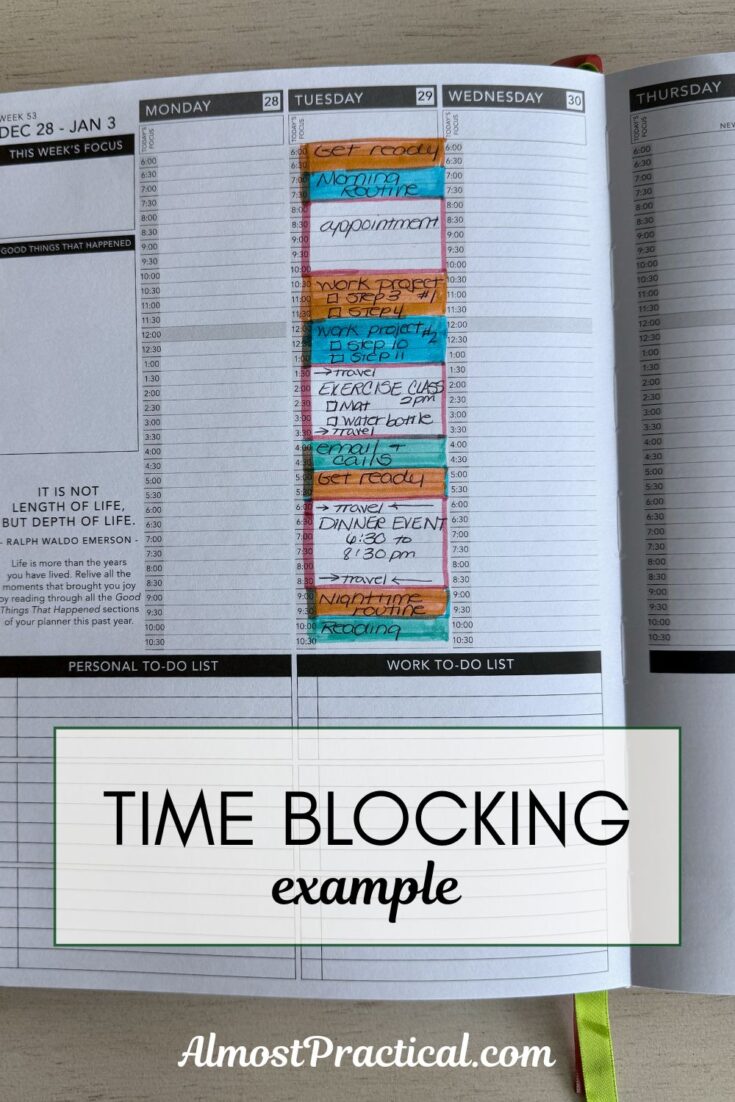
Step 2: Use Your Planner as Your Workspace for Time Blocking
I like to think of my paper planner as my workspace for brainstorming and manipulating the time in each day.
Record Your Fixed Appointments
At the beginning of each week, usually on Sunday, I will look at my electronic calendar for the week ahead, and pencil my scheduled appointments onto my paper planner in the respective hourly spots. I will also highlight the time slots needed for the duration of the appointment as well as whatever time I need before and after for travel or preparation. Then I shade that area in on my planner, similar to what you would see on your electronic calendar.
This is, in essence, a time block.
Make A Plan For Using Your Blocks of “Free” Time
Once you have blocked in all your non-negotiable appointments, you are left with some blank space in between each thing that you have to do. This blank space could represent any length of time from a few minutes to a few hours.
Identify Tasks That Fit Your Available Time
This is when I grab my notebook with my running to do list and start assigning tasks into the free time slots. If I have 15 minutes, I will pick something that doesn’t take much time to accomplish and that also makes locational sense. These little time slots are best for doing things that are small, easy, and not something you need to put a lot of thought into. It also helps if you pick a task to fill up the free time that is near where your previous appointment ended or where your next appointment is going to start.
If my last appointment ends with me sitting at my computer, then I might decide to take a few minutes to quickly organize my computer desktop before my next appointment starts. Or if my appointment starts half an hour after I finish lunch, I might choose to tackle my silverware drawer in my kitchen before I head back to my home office.
Keep Your Energy Levels in Mind
As you work through the process, be mindful of your own energy levels at different times of day and schedule your most difficult tasks at times of peak energy.
For example, my husband loves to get his work out in first thing in the morning. But, I, on the other hand refuse to get moving before one (or maybe two) cups of coffee. I could schedule workouts for myself everyday at 5:30am but that would be a recipe for failure. I know my energy levels and I prefer to accomplish quiet work in the morning.
Batch Similar Tasks
Try to group the items on your running to do list by type. If you have a bunch of emails to send, take a 15 minute block and knock them all out at once. If you have several errands to run, batch them by geographic location and plan to complete them when your schedule takes you to that area.
Step 3: Record Plans for Free Time as New Time Blocks
But remember, I am doing this on Sunday, well in advance of the day during the week that I anticipate having this free block of time. So, it is not enough to think that, hey, I could knock this little task out on Wednesday afternoon. You have to take that free block of time in your planner and shade it in like you are making an appointment with yourself.
It basically starts a chain reaction. By planning to organize your silverware drawer on Wednesday afternoon, you may realize that you need to measure your drawer and get some silverware organizers before Wednesday rolls around. Now you know what you are going to do in your free time between appointments on Monday – take measurements and order some silverware drawer organizers on Amazon! You get the picture.
The Benefits of Writing It Down
Now, you might be wondering, why even do this if it is already blocked out on your electronic calendar.
First, by taking your events from your electronic calendar and blocking them onto paper, you are working with your schedule at a deeper level. This exercise forces you to think through your obligations for the week and plan for them. I feel that you are more likely to be on time and better prepared for the week ahead.
Second, time blocking on paper forces you to make time estimates that are more realistic. If you have to be somewhere at 11am and somewhere else across town at 1pm, will you realistically be able to make it with traffic and a brief stop for lunch? By doing this exercise, you may realize that you need to push one appointment earlier or the other one later to make it work without stressing you out.
However, if you prefer to use an app instead of paper, there are many to choose from. In the Apple ecosystem, you can use a combination of Calendar, Reminders, and Notes for time blocking. There are also apps geared towards project management like Notion or Todoist that are very versatile.
Why Time Blocking Works
Time blocking works for many reasons.
It gives you an upfront plan to follow.
When you assign yourself a block of time to do a task, you know exactly what to do and when to do it. Think of it as a visual map of your day. You no longer have to make decisions at every junction so your energy goes into getting work done and instead of deciding what to do.
When I use time blocking, my calendar becomes my “tour director”. If you have ever gone on a guided tour, all you need to do is show up and follow the itinerary that the tour director gives you. But if you plan a vacation without a plan, you have to figure out where to go and what to see in the moment, which takes much longer.
It helps you set boundaries and stick to your priorities.
Time blocking also serves to assign you both a starting time and a finish time so you don’t dilly dally or go off on tangents. You know you have to finish the task in a given amount of time, you are more likely to stay focused and keep the scope of the project narrow.
It Ties Into “Deep Work” Principles
Cal Newport, a computer science professor at Georgetown University, productivity expert, and author of the book Deep Work, believes if you have uninterrupted blocks of time to work on a task, you will produce higher quality results than you would if your attention was fragmented with little snips of work here and there.
Time blocking is a great way to identify suitable space in your schedule to work on the task at hand.
Things To Watch Out For
The boost in personal productivity that comes from time blocking is pretty amazing but there are a few pitfalls to watch out for.
Overscheduling
There is a tendency that people have to underestimate the amount of time that they need to accomplish something and to do it well.
I would argue that time blocking actually helps you to be more realistic with your time, but make sure to allow enough buffer between activities for little things you don’t thing about like grabbing a cup of coffee or using the bathroom. We do need to refuel and recharge throughout the day.
Being Too Rigid
We don’t live in a perfect world and things come up that we did not plan for. Sometimes meetings run long or traffic holds us up. Be sure to allow yourself time for flexibility. If you know you have students, colleagues, or family members that need your time, make sure to budget time for them.
And most importantly, don’t be too hard on yourself if your day gets derailed. Stuff happens. Just don’t let it stop you from picking yourself up, dusting yourself off, and starting fresh tomorrow.
A “Getting Started” Tip If You Are New To Time Blocking
This article goes in depth into a more developed system that can seem intimidating.
But like anything else, the best way to start is by doing. Try blocking out just one or two chunks of your free time each day. Instead of looking at the whole week at once, take it one day at a time.
What does the rest of your afternoon look like? Schedule a back burner task in your down time and go from there.
Happy planning!